Long sessions
3.1M3 sessions ended several times larger than the 128K this machine usually reaches. Every turn after that re-reads the whole window.
acme-web · 214 turns · 62.4K → 604.1Kbilling-api · 168 turns · 58.1K → 511.7K
Local · open source · zero dependencies
Every Claude Code session on one page — which one is waiting on you, what each is spending, and how much of your limits is left.
npx claude-code-session-tracker@latestThen open the printed http://127.0.0.1:3099.
Node 20 or newer · macOS, Linux, and Windows
Demo
Live sessions, limits and history, on a real machine.
Auto continue
NewA session that stopped on a usage limit continues by itself about a minute after the limit resets. No more coming back to a session that sat idle for hours.
5-hour limit
Session
The session runs until the five-hour limit fills.
Claude Code refuses the turn; the plugin's hook starts waiting.
The page and the menu bar list it, with the time it continues.
A minute after the reset, Claude Code wakes it and it carries on.
In Claude Code, add the plugin that carries the hook:
/plugin marketplace add meyusufdemirci/claude-code-session-tracker/plugin install session-tracker@claude-code-session-trackerThen turn it on:
claude-code-session-tracker auto-continue onOff until you turn it on — on the Settings page, under a full limit on the dashboard, in the macOS menu bar, or with the command above. Needs the plugin at 0.13.0 or later, and only sessions started after it is installed carry the hook.
To turn it off:
claude-code-session-tracker auto-continue off> Add the export dialog
⎿ Usage limit reached · resets 3:00pm
⏸ Waiting for the reset · continues at 3:01pm
⏵ The usage limit that stopped this session has reset;
continue the task you were working on
● Picking up the export dialog where I left off…Claude Code wakes the session itself, so it works the same in VS Code, Ghostty, tmux, iTerm or Terminal.
The wait lives inside the session. No tab, menu bar or tracker needed — just leave the session open.
At the reset it makes sure the switch is still on, that you have not carried on yourself, and that the limit no longer reads as full.
A session can wait up to eight days. Turning it on while sessions are already waiting still covers them.
Preview
Limits on top, sessions below, and details for any row you open.
Claude Code
Sessions
Resets 19:30 · 2h 41m left
At the last hour's pace you'll hit the limit at 18:52, 38m before it resets. Anthropic's reading of this five-hour window, 2m ago.
Resets Mon 25 Aug, 03:00 · 2d 10h left
Every model. Anthropic's reading of this week, 2m ago.
Last 7 days
3 sessions ended several times larger than the 128K this machine usually reaches. Every turn after that re-reads the whole window.
acme-web · 214 turns · 62.4K → 604.1Kbilling-api · 168 turns · 58.1K → 511.7K
Sessions open holding 74.3K — the system prompt, tools, skills and memory files, paid before anything is asked.
38 sessions
Ranked by what each accounts for, in the tokens a limit counts. A finding appears only where the range runs heavier than this machine's own middle.
| Project | Session | Status | Model | Tokens (in/out/total) | Uptime |
|---|---|---|---|---|---|
| acme-web~/code/acme-web | Rework the checkout flow279ed6ae | busy | opus-5 | 182.4K / 12.9K / 195.3K | 1h 24m |
| billing-api~/code/billing-api | Paginate the invoices endpointb41c7d02 | waitinginput needed | sonnet-5 | 96.2K / 7.4K / 103.6K | 18m 42s |
| design-system~/code/design-system | Tidy the button variants5f2a91c4 | idle | sonnet-5 | 41.8K / 3.1K / 44.9K | 3h 06m |
| Project | Session | Model | Last active | Tokens (in/out/total) |
|---|---|---|---|---|
| acme-web~/code/acme-web | Fix the flaky checkout testit only fails on CI, never on my machine | opus-5 | 12m ago | 214.7K / 15.3K / 230.0K |
| mobile-app~/code/mobile-app | Retry the offline write queueflush the queued writes once the connection is back | sonnet-5 | 2h ago | 158.9K / 11.2K / 170.1K |
| docs-site~/code/docs-site | Add dark mode to the docsauto, light and dark, and no flash on first paint | sonnet-5 | 5h ago | 88.4K / 6.1K / 94.5K |
| billing-api~/code/billing-api | Rotate the webhook secretmove it to the secret store and re-sign the callbacks | haiku-4-5 | yesterday | 23.1K / 1.9K / 25.0K |
| acme-web~/code/acme-web | Windows CI: separators in the path testthe path assertions only hold on posix | opus-5 | 3d ago | 61.2K / 4.4K / 65.6K |
50 of 794 on disk
Read-only. Bound to loopback. Nothing leaves this machine.
/filter↑↓move↵openEscclose
Tokens, context left, prompts, and a resume command to copy.
Static context shows what fills the window before you type — CLAUDE.md, skills, tools, MCP — the part you can actually shrink.
Every figure comes straight from the transcript. Nothing is guessed.
acme-web
Rework the checkout flow
busy
19% of 1M tokens · opus-5
41,207 tokens before the first turn ran, estimated from the text each block put in the window.
Its 38 turns read 4.2M back out of cache between them. Those reads bill at a fraction of the rest, so they sit outside the totals above.
Limits
Two windows, five hours and seven days. Each card shows how full it is and when it runs out at your current pace.
Anthropic's own reading of each limit, the same number /usage shows.
Input, output and new cache tokens, across every project and subagent. Cache reads are shown apart.
Based on your recent pace, the card says when the window runs out — or where it will stand at reset.
Red is time elapsed, blue is where you'll land. Fill past the red tick means you're spending too fast, and the bar turns red.
Offline or without a fresh reading, the bar falls back to your heaviest past window — and says so.
Alerts
A desktop notification before a window runs out. Off by default.
Claude Code
Settings
SessionsHistorySettingsA desktop notification before a window runs past its limit.
Session limit
now127.0.0.1:3099
At the last hour's pace you'll hit the limit at 18:52, 38m before it resets.
Hear about a limit before you reach it
A desktop notification when a window is on course to run past its limit — even with this tab behind your editor.
Nothing asks for permission until you flip a switch.
One per interval: an hour for the session, four for the week.
Suggested once when a limit first appears.
A week with no reset from Claude stays silent.
History
A second page with your tokens by day, hour, project and model — plus your year at a glance, a report to export, and a picture to share.
Claude Code
History
SessionsHistorySettings25 Jul – 23 Aug · 30 days
Billed tokens per local day. A mark under a bar is a turn Claude refused.
Every half hour of the range, over one week. Darker is heavier.
Billed tokens per local day. Darker is heavier.
Ranked by billed tokens. Pick one to narrow everything above.
| Project | Turns | Billed | Cache reads | Share |
|---|---|---|---|---|
| acme-web~/code/acme-web | 4,182 | 18.4M | 902.6M | 44% |
| billing-api~/code/billing-api | 2,140 | 9.1M | 431.7M | 22% |
| mobile-app~/code/mobile-app | 1,884 | 6.7M | 318.2M | 16% |
| design-system~/code/design-system | 1,102 | 4.3M | 205.9M | 10% |
| docs-site~/code/docs-site | 903 | 3.3M | 154.1M | 8% |
Every model that answered in this range.
| Model | Turns | Billed | Cache reads | Share |
|---|---|---|---|---|
| opus-5 | 6,204 | 27.6M | 1.3B | 66% |
| sonnet-5 | 3,411 | 12.1M | 620.4M | 29% |
| haiku-4-5 | 596 | 2.1M | 92.1M | 5% |
Read at 21:14
A bar per day, quiet days included — or folded into weeks or months for a long range. A mark under a bar is a day Claude refused a turn.
A month folded onto one week — when your window actually opens.
A calendar year as a grid, shaded against your own busiest days. Step back a year with ‹ ›.
Ranked by billed tokens, with the full path under each project. Pick one to narrow everything to it.
Any range as a PDF or an .xlsx — daily, weekly or monthly, one project or all. Written in the browser, sent nowhere.
The year grid as an image, with a post for X or LinkedIn ready to paste it into. Nothing is posted for you.
Reuses the limit cards' read, so it costs almost nothing. Nothing polls — click Refresh.Bookmarkable: range, grouping, year and project live in the URL. Ranges reach back a year and a week.
What you get
Limits, live status, token usage and history, on one page.
Quickstart
No install needed. Or use Homebrew to keep it on your PATH.
npx claude-code-session-tracker@latestNo install step. It starts a local server and opens your browser.
Served at http://127.0.0.1:3099.
Refreshes every 2 seconds. Click a row for details.
Start at login
One command adds it to your login items. Another takes it out.
brew install meyusufdemirci/tap/claude-code-session-trackerclaude-code-session-tracker autostart onAdded as a Login Item, listed in System Settings → General → Login Items.
To turn it off:
claude-code-session-tracker autostart offA login item needs a copy that stays on disk, so npx won't do here.
One command, no admin rights. It starts the tracker right away, too.
The dashboard opens at http://127.0.0.1:3099 every time.
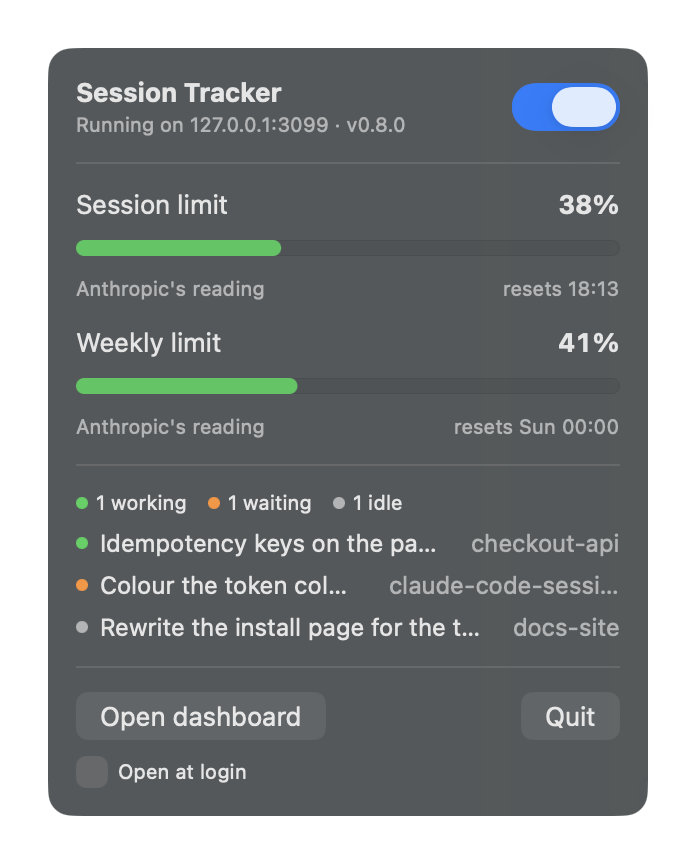
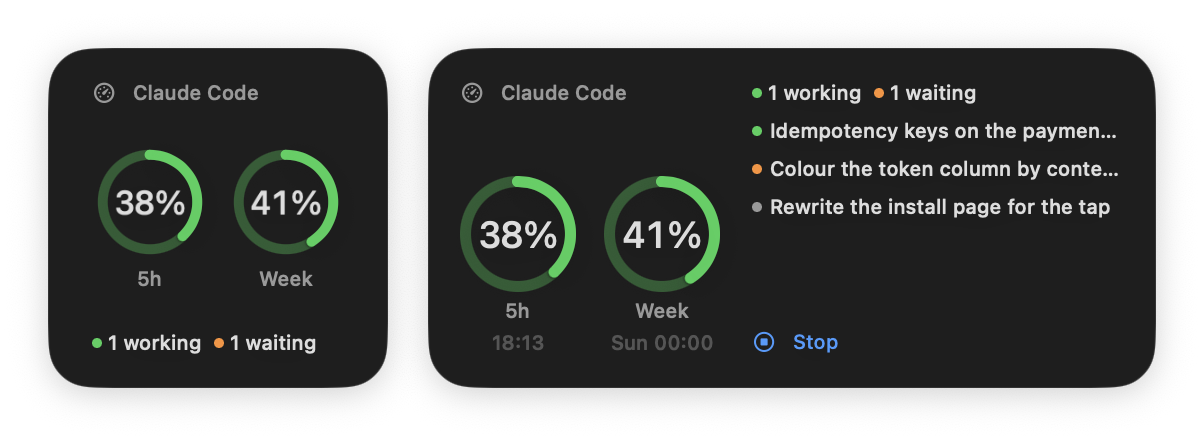
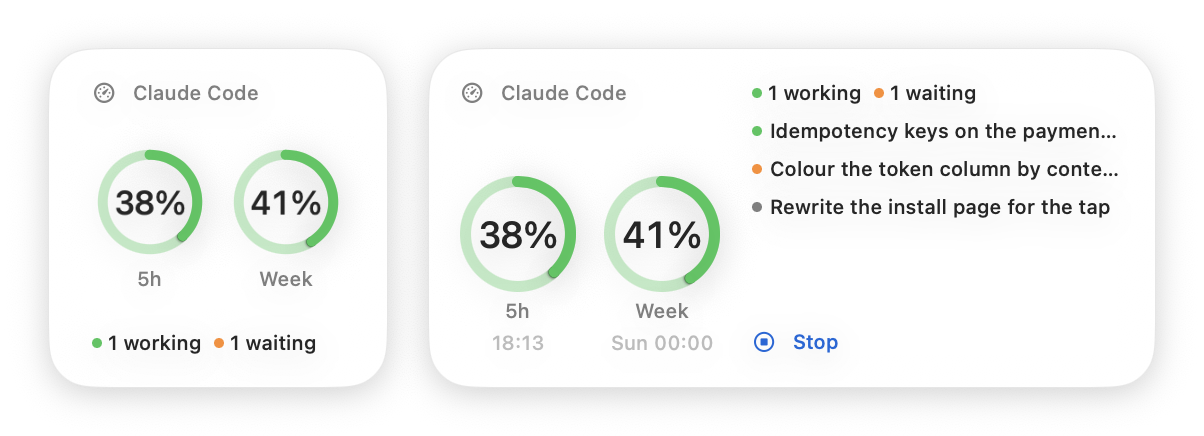
Menu bar and widget · macOS
A small native app with a switch for the tracker, and a widget that shows both limits as rings.
npx claude-code-session-tracker@latest menubar install --with-trackerNeeds macOS 14 or later. The app is signed to run locally, not with an Apple Developer ID. When a newer version is out, the panel says so, and Update upgrades the tracker, restarts it and updates the app too.
To remove it:
claude-code-session-tracker menubar uninstall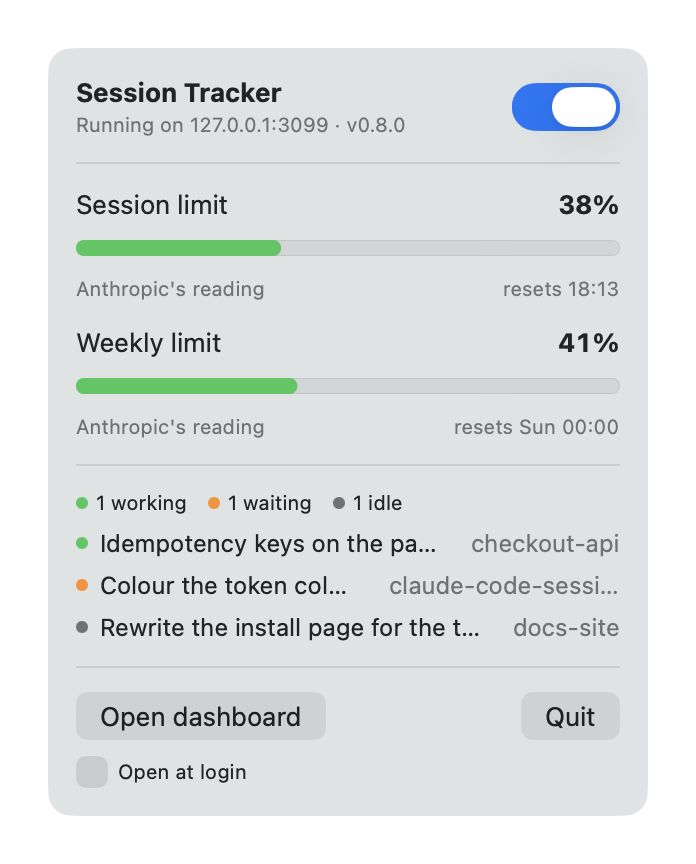
Turns the tracker on and off. The panel under it shows both limits, when they reset, and the sessions that are running.
The same two limits as rings, on the desktop or in Notification Center. Click it to open the page.
--with-tracker installs the tracker first — with Homebrew, or npm where there is none. Leave it off when you already have it.
Downloaded from that version's GitHub release and no other. Anything that does not match the package's SHA-256 is refused.
Inside Claude Code
A Claude Code plugin: /session-tracker:status prints your limits and running sessions, /session-tracker:open opens the page.
Add the repository as a marketplace, then install it:
/plugin marketplace add meyusufdemirci/claude-code-session-tracker/plugin install session-tracker@claude-code-session-tracker| Command | What it does |
|---|---|
| /session-tracker:status | Prints both limits and when they reset, what today has billed, and the sessions that are running |
| /session-tracker:open | Opens the page in your browser, starting the tracker first if it is not running |
  Claude Code Session Tracker 0.11.0

  5-hour limit  12% used, resets in 3h
  Weekly limit  12% used, resets in 4d 9h
  Today         3.9M tokens in 637 turns

  Running       2 sessions
    busy     my-app      Add the export dialog
    waiting  my-api      Fix the flaky login test (input needed)

Dashboard http://127.0.0.1:3099Ask how much of the weekly limit is left and Claude runs /session-tracker:status by itself. /session-tracker:open only runs when you type it.
A running tracker is asked. When none is, the same numbers are read straight from your Claude directory.
Each command, and the auto continue hook, runs the CLI — the copy on your PATH, otherwise npx.
status and open are ordinary commands, so they work outside Claude Code too.
Command line
Every flag, command and keyboard shortcut.
| Flag or command | Description | Default |
|---|---|---|
| -p, --port <number> | Port to listen on, stepping forward up to 20 times if taken | 3099 |
| --host <address> | Address to bind. Anything but loopback drops the guard, and the CLI says so | 127.0.0.1 |
| --no-open | Do not open a browser | — |
| --json | Print the session list as JSON and exit | — |
| -n, --limit <number> | How many sessions to list. Running sessions always show | 50 |
| --claude-dir <path> | Override the Claude data directory | ~/.claude |
| --offline | Never ask Anthropic's server for the usage limits, or npm for a newer version; the cards fall back to Claude Code's cached readout or an estimate | — |
| autostart on | Start at login and open the page, on macOS and Windows. Starts it now, too | — |
| autostart off | Stop starting at login | — |
| autostart status | Say whether it starts at login | — |
| auto-continue on | Continue sessions that stopped on a usage limit once it resets. Needs the Claude Code plugin | — |
| auto-continue off | Leave them stopped | — |
| auto-continue status | Say whether it is on, and which sessions are waiting | — |
| status | Print both limits, what today has billed and the running sessions, from a running tracker or straight from disk | — |
| open | Open the page, starting the tracker in the background first if it is not running | — |
| menubar install | Download the macOS menu bar app and widget for this version, install and open them. Run again to update | — |
| menubar install --with-tracker | The same, and install the tracker itself first when this copy came from npx or another one-off runner | — |
| menubar uninstall | Quit the app and remove it | — |
| menubar status | Say whether the app is installed, and whether it is the tracker's version | — |
| -h, --help | Show usage | — |
| -v, --version | Show the version | — |
Scripting
Anything the page does, you can do with curl.
| Method | Route |
|---|---|
| GET | /api/sessions?limit=NThe session list. `limit` matches --limit, and running sessions are always included. |
| GET | /api/sessions?since=&until=The same list, narrowed by last-written time. Epoch ms; `since` inclusive, `until` exclusive. |
| GET | /api/sessions?sort=`recent` (default), `tokens-desc`, or `tokens-asc`. Ranks across the whole window, not just the page. |
| GET | /api/sessions/:idOne session with counts, tokens, models, activeMs, awaySummary, and notes. |
| GET | /api/limitsBoth limits, as `session` (five hours) and `weekly` (seven days). Each carries the window in progress, Anthropic's percentage as `reported`, the heaviest closed window, and `lastLimited`. |
| GET | /api/usage/history?since=&until=&project=&perProject=A sparse half-hour series, plus every project and model in the range ranked by billed tokens. Defaults to 30 days; spans over a year and a week (371 days) are narrowed, and `range` in the reply is what was read. `perProject=1` adds each project's own series. |
| GET | /api/usage/adviceThe findings behind the `Where it goes` panel as measurements, not sentences. Same params as the history route; defaults to 7 days. |
| GET | /api/update`current` and `latest` from npm, whether an update is `available`, how it was installed as `method`, the `command` that updates it, and `canInstall` with the `install` progress. |
| POST | /api/update/installUpdates to `latest` with the package manager that installed it, restarts on the same port, and updates the menu bar app. Answers 202; `GET /api/update` follows it. Requires a loopback Origin. |
| GET | /api/auto-continueWhether auto continue is `enabled`, the `plugin`'s state (`ready`, `missing`, `outdated` or `disabled`), the sessions `pending` a reset with `continueAt`, and the latest `continued` ones. |
| POST | /api/auto-continueTurns it on or off: `{"enabled": true}`. Answers with the same body as the GET. Requires a loopback Origin. |
| GET | /api/healthStatus, version, the Node it runs on, the resolved Claude directory, and per-source status. |
| POST | /api/sessions/:id/revealShows that transcript in your file manager. Requires a loopback Origin. |
--json prints the same payload the page uses, then exits.
npx claude-code-session-tracker@latest --json | jq '.sessions[] | .project.name'{
"sessions": [
{
"id": "279ed6ae-49fd-4234-a74e-145f5535341c",
"source": "claude-code",
"status": "busy", // busy · waiting · idle · ended
"project": { "name": "…", "path": "…", "gitBranch": "main" },
"title": "Disable dependabot", // Claude's own title, when it wrote one
"firstPrompt": "…",
"lastPrompt": "…",
"model": "claude-sonnet-5",
"version": "2.1.235",
"startedAt": 1787142489923,
"lastActiveAt": 1787142700231,
"transcriptPath": "…/279ed6ae….jsonl",
"sizeBytes": 136133,
"live": { "pid": 4129, "kind": "interactive", "entrypoint": "cli" }
}
],
"total": 794,
"generatedAt": 1787142701002
}Privacy
Read-only, loopback-only, and no telemetry.
It only reads what Claude Code already wrote.
Binds to 127.0.0.1 and rejects other hosts, so no website can reach it.
Claude Code's usage endpoint, and the npm registry for the newest version number. No telemetry, no analytics. Your package manager runs only when you click Update. The macOS app is downloaded only when you ask for it.
Auto continue, once you turn it on, wakes a session that stopped on a limit. Its switch and the waiting list live in the tracker's own folder.
Nothing third-party runs on your machine.
| Path | Used for |
|---|---|
| ~/.claude/sessions/<pid>.json | Running sessions and their live status |
| <session cwd>/.git/HEAD | The branch a running session is on |
| ~/.claude/projects/**/*.jsonl | Session history — titles, prompts, models, branch |
| ~/.claude/projects/*/*/subagents/agent-*.jsonl | Subagent turns, for the limit windows they bill to |
| ~/.claude.json | The usage readout Claude Code caches — how full each limit is, and when it resets |
| Keychain · ~/.claude/.credentials.json | The token Claude Code is signed in with, to ask for the same readout /usage shows. Skipped with --offline |
FAQ
Node 20 or newer · macOS, Linux, and Windows. MIT licensed.
npx claude-code-session-tracker@latest